Easy Checkout Fields – Custom checkout fields for PrestaShop
Add custom fields to the PrestaShop checkout, shown only to the customers concerned, and find every answer in the order, emails, invoices and CSV.
My Easy Checkout Fields – Custom checkout fields for PrestaShop license
Custom checkout fields for PrestaShop, asked only when needed
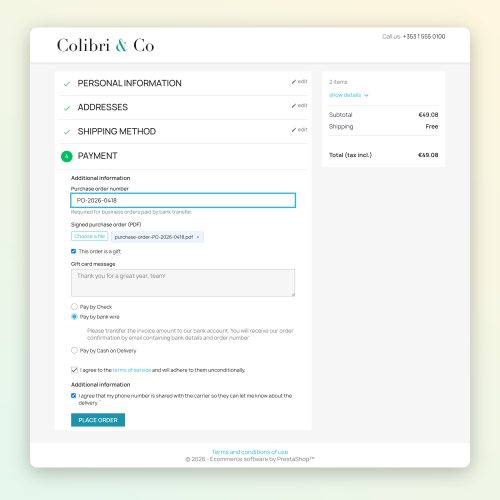
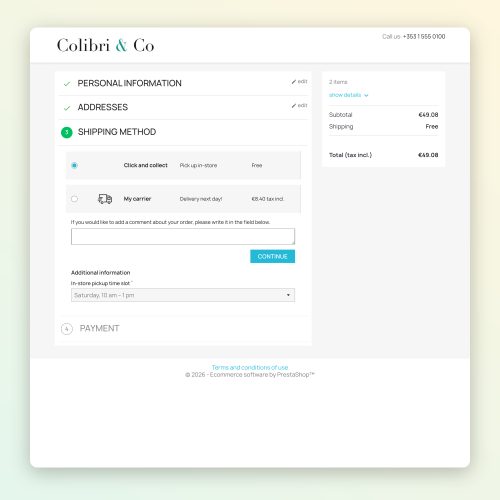
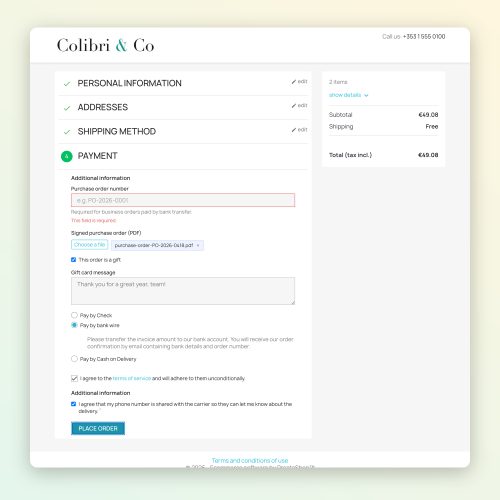
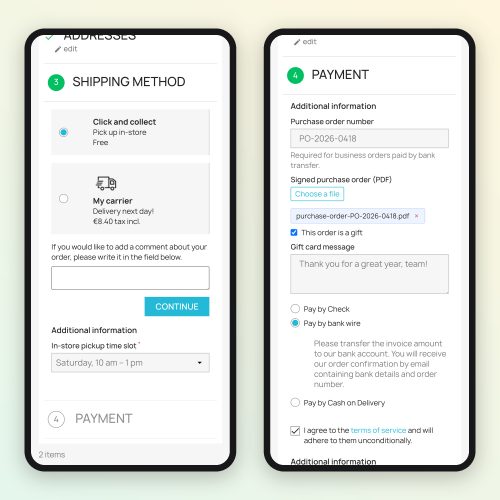
Requested delivery date, pickup slot, door code and floor, purchase order number, gift message, file to print: Easy Checkout Fields adds these questions to the native PrestaShop checkout, without editing your theme. 14 multilingual field types, 5 of them in the free plan (text, text area, list, yes/no, consent) plus a message block.
What merchants ask at checkout
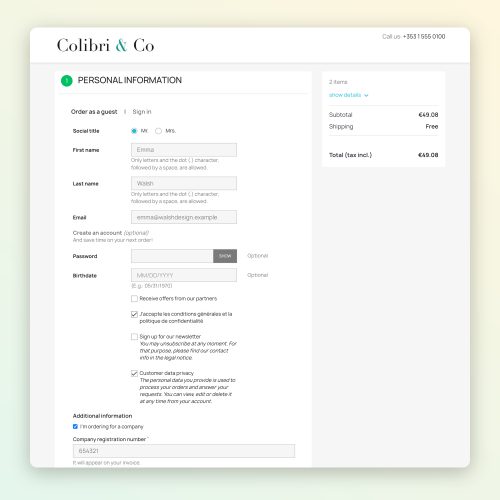
Delivery: requested delivery date, delivery instructions, door code and floor. Click and collect: a pickup slot that only appears when the customer chooses in-store pickup. B2B: a company registration number when the customer orders for a company, a purchase order number required only for bank transfers. Gifts: a gift message. Print and personalisation: a file sent with the order. Consent: a GDPR or terms checkbox, recorded with the order.
Only ask the customers concerned
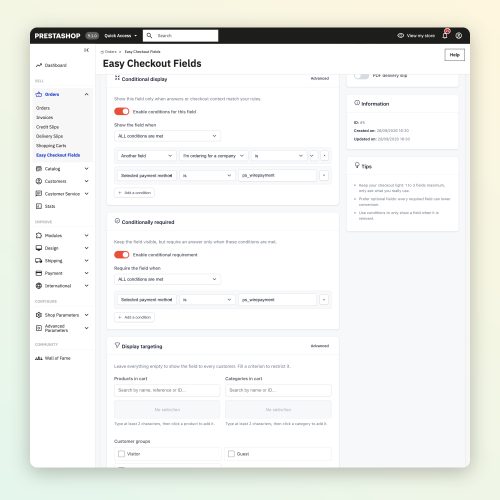
With Pro, target a field by products, categories, customer groups, languages and carriers, and show it depending on another answer, the carrier, the payment method, the country, the cart amount or contents, the customer group or guest status. Make it required depending on the answer to another field or on that same context.
No answer lost
Every answer is saved as the customer types, checked at each step and again before payment, and the rules are checked again on the server. A field in error that the customer cannot see never blocks payment.
Answers follow the order
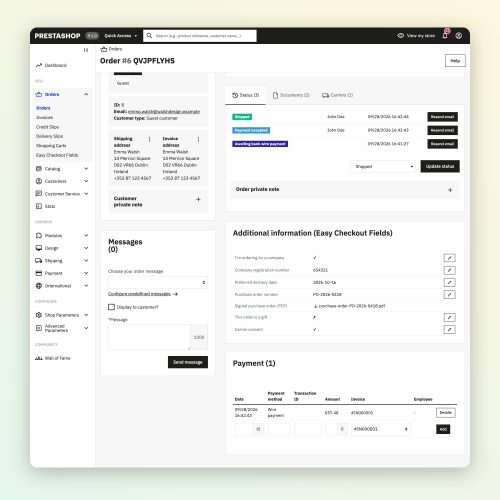
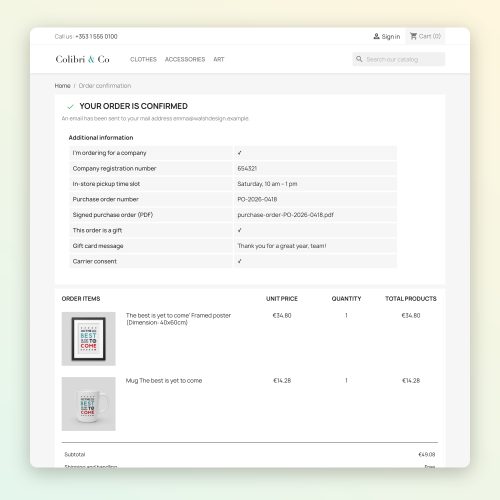
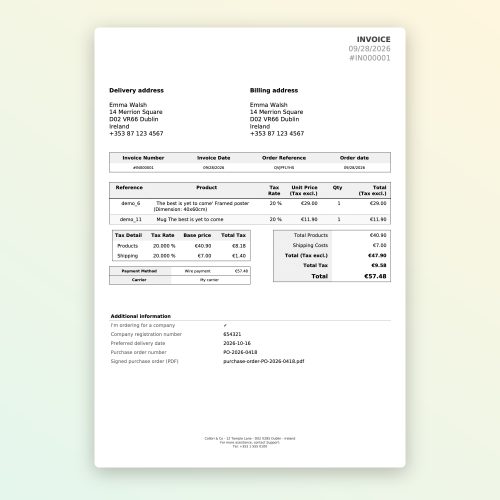
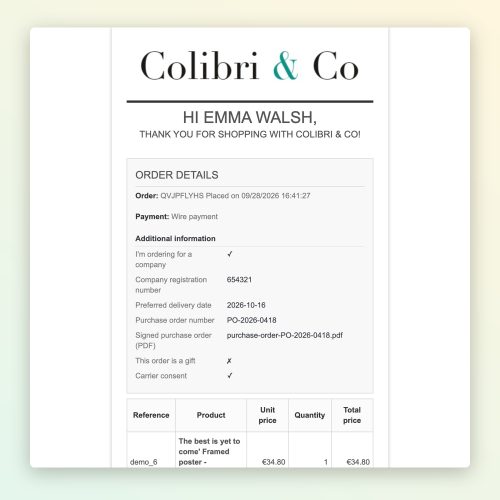
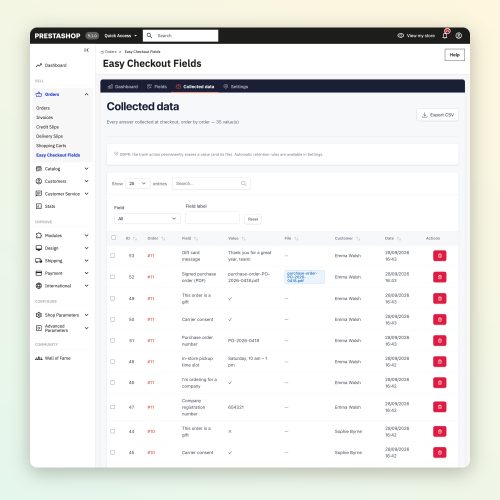
Back-office order page, confirmation page, customer account, confirmation emails to the customer and the “new order” email to the merchant. With Pro: PDF invoice, delivery slip, a CSV export with one row per order, protected against formulas, and editing of the answers from the order. An order split between several carriers keeps its answers on each order.
GDPR tools from the free plan
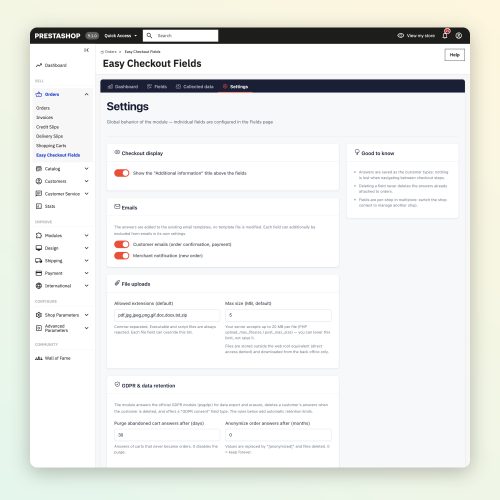
Export and erasure through the psgdpr module, abandoned cart purge, scheduled anonymisation, one-by-one deletion. Labels are frozen with the order: history stays readable even when you edit a field. Multistore on every plan.
How to add a custom field to the PrestaShop checkout
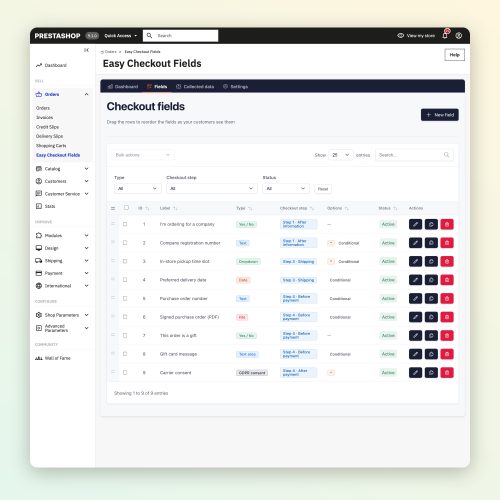
In the back office, open Modules > Module Manager, click “Upload a module” and drop the ZIP. Open Easy Checkout Fields and create a field: give it a label, choose a type and the checkout step where it appears. With Pro, add a targeting rule or a condition. Place a test order: the answer shows on the order page and in the confirmation email.
Easy Checkout Fields: frequently asked questions
Is there a free PrestaShop module to add checkout fields?
Yes. The Easy Checkout Fields Free plan adds up to 3 fields of 5 types (text, text area, list, yes/no, consent) and a message block, in 8 checkout positions, with the answers in the back office, on the confirmation page, in the customer account and in the emails. GDPR tools and multistore are included. Pro (€2 per month or €19.20 per year, everything included) adds unlimited fields, all 14 types, targeting, conditions, file upload, PDF invoice and CSV export.
Can a field be shown only for one payment method or carrier?
Yes, with Pro: a field can depend on the payment method, the carrier, the country, the cart amount or contents, the customer group, guest status or another answer, with AND/OR rules. A field hidden by its conditions never blocks the order.
Can a field be required only for business customers?
Yes, with Pro. A field becomes required depending on the answer to another field, for instance “I'm ordering for a company”, or depending on the context: the purchase order number is then required only when a business customer pays by bank transfer.
Where do the answers appear?
On the back-office order page, the confirmation page, in the customer account and in the confirmation emails, including the “new order” email sent to you. With Pro: PDF invoice, delivery slip and CSV export, one row per order, and you can correct an answer from the order page.
Can customers upload a file at checkout?
Yes, with Pro. You choose the allowed extensions; the real file type is checked, the file is renamed at random, is never executable and can only be downloaded from the back office.
Does it work with my theme and one-page checkout modules?
Easy Checkout Fields is validated on the native PrestaShop checkout with the Classic theme, from PrestaShop 1.7.6 to 9.1. Hummingbird and the PrestaShop 9.2 one-page checkout are planned for version 1.2. Third-party one-page checkouts and heavily modified checkouts are not validated yet: test with the free plan first.
Compatibility
PrestaShop 1.7.6 to 9.1 (tested on 1.7.6, 1.7.7, 1.7.8, 8.0, 8.1, 8.2, 9.0 and 9.1), native checkout, Classic theme. Hummingbird and PrestaShop 9.2: planned for version 1.2.
Pro plan: €2 per month or €19.20 per year, everything included. The free plan and the Pro plan are available now.
- 14 multilingual field types (5 in the free plan, plus a message block)
- 8 checkout positions, before and after each step
- Show or require a field depending on another answer, the carrier, the payment, the country or the cart
- Answers in the back office, confirmation page, customer account and customer and merchant emails
- PDF invoice, delivery slip and a formula-safe CSV export
- GDPR tools and multistore on every plan
- Show a field depending on the chosen payment method, which no PrestaShop field module reviewed in September 2026 offers, and combine it with the carrier, country, cart, customer group or another answer (AND/OR, 8 operators).
- Conditional requirement: a field stays visible and only becomes required when needed, for instance the purchase order number of business customers paying by bank transfer.
- Secure file upload: allowed extensions, real file type check, files renamed at random and never executable, downloaded from the back office.
- A real free plan, then Pro at €2 per month, everything included: every feature, compatibility updates and support.
2. In PrestaShop, open Modules > Module Manager.
3. Click “Upload a module” and select the ZIP.
4. Open Easy Checkout Fields and create your first field: a label, a type and a checkout step are enough.
Pricing
Free
- 3 fields
- 5 types (text, text area, list, yes/no, consent) and a message block
- 8 positions, autosave and a check at each step
- Answers in the back office, confirmation page, customer account and emails
- GDPR tools and multistore
Pro
2,00 € /month- Every feature included, nothing locked
- Unlimited fields and all 14 types, file field included
- Show a field depending on another answer and the context (cart, carrier, payment, country, group, guest)
- Targeting by products, categories, groups, languages and carriers
- Field required depending on another answer or the context
- PDF invoice, delivery slip, CSV export and answer editing in the back office